
Service overview
This page describes how to use our KEEQuant services.
You will receive your account from one of your KEEQuant contact points during project execution. So please contact that person to receive an account. Upon creation, you should receive an e-mail from Gitlab to set your password.
We offer the following services:
- Gitlab: a project management tool, offering issue tracking and Kanban boards as well as a code versioning tool, based on git
- Nextcloud: A data sharing cloud software, much like Google drive or Dropbox with added functionality of a groupware, like Calendars, Contacts, Office etc.
- Mattermost: A chat software with a team and channel system as well as private messages, much like Slack or Discord
All services reside on a server rented by KEEQuant, hosted by a German server provider with its server location in Germany.
Note that for some projects, we use a mixture of our Extranet and for example MS Teams, which typically replaces the functionality of Mattermost (Chat) and Nextcloud (Storage).
Gitlab
The account will technically be created and maintained in Gitlab, while other services like Mattermost or Nextcloud will rely on that account information and authenticate themselves via Gitlab.
Mattermost
Once logged in to Mattermost, you won’t see any teams, since you have to be assigned manually by your KEEQuant contact point to the specific project, so please notify them once you logged in.
Nextcloud
Please log in to Nextcloud via the Gitlab button (see screenshot below).
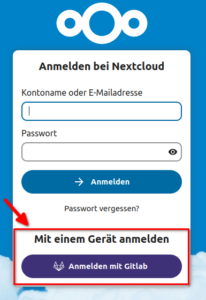
Once logged in, you should immediately see a Group Folder with the name of your project. This is where all project-related files are stored.